<?xml version="1.0" encoding="utf-8"?><feed xmlns="http://www.w3.org/2005/Atom" ><generator uri="https://jekyllrb.com/" version="3.10.0">Jekyll</generator><link href="https://devopswithdave.com/feed.xml" rel="self" type="application/atom+xml" /><link href="https://devopswithdave.com/" rel="alternate" type="text/html" /><updated>2025-06-25T13:22:13+00:00</updated><id>https://devopswithdave.com/feed.xml</id><title type="html">DevOps With Dave</title><subtitle>Write an awesome description for your new site here. You can edit this line in _config.yml. It will appear in your document head meta (for Google search results) and in your feed.xml site description.</subtitle><author><name>Dave Furmidge</name></author><entry><title type="html">Building and Deploying a Modern API with FastAPI, Firestore, and Google Cloud Run</title><link href="https://devopswithdave.com/gcp/firestore/fastapi/github%20actions/post-fastapi-modern-api/" rel="alternate" type="text/html" title="Building and Deploying a Modern API with FastAPI, Firestore, and Google Cloud Run" /><published>2025-06-17T00:00:00+00:00</published><updated>2025-06-17T00:00:00+00:00</updated><id>https://devopswithdave.com/gcp/firestore/fastapi/github%20actions/post-fastapi-modern-api</id><content type="html" xml:base="https://devopswithdave.com/gcp/firestore/fastapi/github%20actions/post-fastapi-modern-api/"><![CDATA[<p>In this guide, we’ll build a modern REST API using FastAPI, store data in Firestore, and deploy it to Google Cloud Run using GitHub Actions for continuous deployment. This stack gives us a scalable, serverless solution with minimal operational overhead.</p>

<h2 id="prerequisites">Prerequisites</h2>
<ul>
  <li>Python 3.8+</li>
  <li>Google Cloud Platform account</li>
  <li>GitHub account</li>
  <li>Basic knowledge of Python and REST APIs</li>
</ul>

<h2 id="1-project-setup">1. Project Setup</h2>
<p>First, let’s create our project structure:</p>

<div class="language-plaintext highlighter-rouge"><div class="highlight"><pre class="highlight"><code>mkdir fastapi-firestore-api
cd fastapi-firestore-api
python -m venv venv
source venv/bin/activate  # On Windows: .\venv\Scripts\activate
</code></pre></div></div>
<p>Create a <code class="language-plaintext highlighter-rouge">requirements.txt</code>:</p>
<div class="language-plaintext highlighter-rouge"><div class="highlight"><pre class="highlight"><code>fastapi==0.104.1
uvicorn==0.24.0
google-cloud-firestore==2.13.1
pydantic==2.4.2
python-dotenv==1.0.0
</code></pre></div></div>
<p>Install dependencies:</p>
<div class="language-plaintext highlighter-rouge"><div class="highlight"><pre class="highlight"><code>pip install -r requirements.txt
</code></pre></div></div>
<h2 id="2-building-the-api">2. Building the API</h2>
<p>Let’s create a simple task management API. First, create <code class="language-plaintext highlighter-rouge">main.py</code>:</p>
<div class="language-plaintext highlighter-rouge"><div class="highlight"><pre class="highlight"><code>from fastapi import FastAPI, HTTPException
from google.cloud import firestore
from pydantic import BaseModel
from typing import Optional
import os

app = FastAPI(title="Task Manager API")

# Initialize Firestore client
db = firestore.Client()

class Task(BaseModel):
    title: str
    description: Optional[str] = None
    completed: bool = False

@app.get("/")
async def root():
    return {"message": "Welcome to Task Manager API"}

@app.post("/tasks/")
async def create_task(task: Task):
    task_dict = task.dict()
    doc_ref = db.collection('tasks').document()
    doc_ref.set(task_dict)
    return {"id": doc_ref.id, **task_dict}

@app.get("/tasks/")
async def list_tasks():
    tasks = []
    for doc in db.collection('tasks').stream():
        tasks.append({"id": doc.id, **doc.to_dict()})
    return tasks

@app.get("/tasks/{task_id}")
async def get_task(task_id: str):
    doc = db.collection('tasks').document(task_id).get()
    if not doc.exists:
        raise HTTPException(status_code=404, detail="Task not found")
    return {"id": doc.id, **doc.to_dict()}

@app.put("/tasks/{task_id}")
async def update_task(task_id: str, task: Task):
    doc_ref = db.collection('tasks').document(task_id)
    if not doc_ref.get().exists:
        raise HTTPException(status_code=404, detail="Task not found")
    doc_ref.update(task.dict())
    return {"id": task_id, **task.dict()}

@app.delete("/tasks/{task_id}")
async def delete_task(task_id: str):
    doc_ref = db.collection('tasks').document(task_id)
    if not doc_ref.get().exists:
        raise HTTPException(status_code=404, detail="Task not found")
    doc_ref.delete()
    return {"message": "Task deleted"}
</code></pre></div></div>

<h2 id="3-local-development">3. Local Development</h2>
<p>Create a <code class="language-plaintext highlighter-rouge">.env</code> file for local development:</p>
<div class="language-plaintext highlighter-rouge"><div class="highlight"><pre class="highlight"><code>GOOGLE_APPLICATION_CREDENTIALS=path/to/your/service-account-key.json
</code></pre></div></div>
<p>Run the API locally:</p>
<div class="language-plaintext highlighter-rouge"><div class="highlight"><pre class="highlight"><code>uvicorn main:app --reload
</code></pre></div></div>
<p>Visit http://localhost:8000/docs to see the Swagger UI documentation.</p>

<h2 id="4-docker-setup">4. Docker Setup</h2>
<p>Create a Dockerfile:</p>
<div class="language-plaintext highlighter-rouge"><div class="highlight"><pre class="highlight"><code>FROM python:3.9-slim

WORKDIR /app

COPY requirements.txt .
RUN pip install --no-cache-dir -r requirements.txt

COPY . .

CMD ["uvicorn", "main:app", "--host", "0.0.0.0", "--port", "8080"]
</code></pre></div></div>
<h2 id="5-google-cloud-setup">5. Google Cloud Setup</h2>
<p>Enable required APIs:</p>
<div class="language-plaintext highlighter-rouge"><div class="highlight"><pre class="highlight"><code>gcloud services enable run.googleapis.com
gcloud services enable firestore.googleapis.com
gcloud services enable containerregistry.googleapis.com
</code></pre></div></div>
<p>Create a Firestore database in Native mode.</p>
<h2 id="6-github-actions-setup">6. GitHub Actions Setup</h2>
<p>Create <code class="language-plaintext highlighter-rouge">.github/workflows/deploy.yml</code>:</p>

<div class="language-plaintext highlighter-rouge"><div class="highlight"><pre class="highlight"><code>name: Deploy to Cloud Run

on:
  push:
    branches: [main]

jobs:
  deploy:
    runs-on: ubuntu-latest

    steps:
    - name: Checkout code
      uses: actions/checkout@v4

    - name: Set up Google Cloud SDK
      uses: google-github-actions/setup-gcloud@v2
      with:
        project_id: $
        service_account_key: $

    - name: Configure Docker for GCP
      run: gcloud auth configure-docker

    - name: Build and push Docker image
      run: |
        docker build -t gcr.io/$/task-api:$GITHUB_SHA .
        docker push gcr.io/$/task-api:$GITHUB_SHA

    - name: Deploy to Cloud Run
      run: |
        gcloud run deploy task-api \
          --image gcr.io/$/task-api:$GITHUB_SHA \
          --region $ \
          --platform managed \
          --allow-unauthenticated \
          --set-env-vars "GOOGLE_CLOUD_PROJECT=$"
</code></pre></div></div>
<h2 id="7-github-repository-setup">7. GitHub Repository Setup</h2>
<ul>
  <li>Create a new repository on GitHub</li>
  <li>Add these secrets in your repository settings:
    <ul>
      <li>GCP_PROJECT_ID: Your Google Cloud project ID</li>
      <li>GCP_SA_KEY: Your service account key JSON</li>
      <li>REGION: Your preferred GCP region (e.g., us-central1)</li>
    </ul>
  </li>
</ul>

<h2 id="8-testing-the-api">8. Testing the API</h2>
<p>Once deployed, you can test your API using curl or any HTTP client:</p>
<div class="language-plaintext highlighter-rouge"><div class="highlight"><pre class="highlight"><code># Create a task
curl -X POST "https://your-cloud-run-url/tasks/" \
     -H "Content-Type: application/json" \
     -d '{"title": "Learn FastAPI", "description": "Build a REST API"}'

# List tasks
curl "https://your-cloud-run-url/tasks/"

# Get a specific task
curl "https://your-cloud-run-url/tasks/{task_id}"

# Update a task
curl -X PUT "https://your-cloud-run-url/tasks/{task_id}" \
     -H "Content-Type: application/json" \
     -d '{"title": "Learn FastAPI", "description": "Build a REST API", "completed": true}'

# Delete a task
curl -X DELETE "https://your-cloud-run-url/tasks/{task_id}"
</code></pre></div></div>
<h2 id="9-best-practices-and-considerations">9. Best Practices and Considerations</h2>
<ul>
  <li>Error Handling: Add more robust error handling and validation</li>
  <li>Authentication: Add authentication using Firebase Auth or similar</li>
  <li>Rate Limiting: Implement rate limiting for production</li>
  <li>Logging: Add structured logging</li>
  <li>Monitoring: Set up Cloud Monitoring</li>
  <li>Testing: Add unit and integration tests</li>
  <li>CI/CD: Add testing steps to GitHub Actions</li>
</ul>

<h2 id="10-next-steps">10. Next Steps</h2>
<ul>
  <li>Add user authentication</li>
  <li>Implement pagination for list endpoints</li>
  <li>Add filtering and sorting</li>
  <li>Set up monitoring and alerting</li>
  <li>Add automated testing</li>
  <li>Implement caching
    <h2 id="conclusion">Conclusion</h2>
    <p>This setup gives you a modern, scalable API that’s easy to maintain and deploy. The combination of FastAPI, Firestore, and Cloud Run provides a powerful yet simple solution for building and deploying APIs.
The code is available on GitHub, and you can deploy it to your own GCP project by following the setup steps.</p>
  </li>
</ul>]]></content><author><name>Dave Furmidge</name></author><category term="GCP" /><category term="Firestore" /><category term="Fastapi" /><category term="Github Actions" /><category term="gcp" /><category term="firestore" /><category term="fastapi" /><category term="python" /><category term="github-actions" /><summary type="html"><![CDATA[In this guide, we’ll build a modern REST API using FastAPI, store data in Firestore, and deploy it to Google Cloud Run using GitHub Actions for continuous deployment. This stack gives us a scalable, serverless solution with minimal operational overhead.]]></summary></entry><entry><title type="html">Setting Up Firestore in Native Mode: A Detailed Guide</title><link href="https://devopswithdave.com/gcp/firestore/post-create-firestore/" rel="alternate" type="text/html" title="Setting Up Firestore in Native Mode: A Detailed Guide" /><published>2025-06-15T00:00:00+00:00</published><updated>2025-06-15T00:00:00+00:00</updated><id>https://devopswithdave.com/gcp/firestore/post-create-firestore</id><content type="html" xml:base="https://devopswithdave.com/gcp/firestore/post-create-firestore/"><![CDATA[<h2 id="what-is-firestore-native-mode">What is Firestore Native Mode?</h2>

<p>Firestore Native mode is the recommended way to use Firestore. It’s a fully managed, serverless NoSQL database that automatically scales and provides real-time updates. It’s different from Datastore mode (the older version) and offers better performance and features.</p>

<h2 id="step-by-step-setup">Step-by-Step Setup</h2>

<h3 id="1-access-the-firestore-console">1. Access the Firestore Console</h3>

<ol>
  <li>Go to the <a href="https://console.cloud.google.com">Google Cloud Console</a></li>
  <li>Select your project</li>
  <li>In the left navigation menu, find “Firestore” under “Databases”</li>
</ol>

<h3 id="2-create-the-database">2. Create the Database</h3>

<ol>
  <li>Click “Create Database”</li>
  <li>You’ll see two options:
    <ul>
      <li><strong>Native mode</strong> (Recommended)</li>
      <li><strong>Datastore mode</strong> (Legacy)</li>
    </ul>
  </li>
  <li>Select “Native mode”</li>
</ol>

<h3 id="3-choose-a-location">3. Choose a Location</h3>

<p>You’ll need to select a location for your database. This is important because:</p>
<ul>
  <li>It affects latency</li>
  <li>It can’t be changed later</li>
  <li>It should be close to your users</li>
</ul>

<p>Common options:</p>
<ul>
  <li><code class="language-plaintext highlighter-rouge">us-central1</code> (Iowa) - Good default for US</li>
  <li><code class="language-plaintext highlighter-rouge">europe-west1</code> (Belgium) - Good for Europe</li>
  <li><code class="language-plaintext highlighter-rouge">asia-east1</code> (Taiwan) - Good for Asia</li>
</ul>

<h3 id="4-choose-a-starting-mode">4. Choose a Starting Mode</h3>

<p>You’ll be asked to choose a starting mode:</p>

<ol>
  <li><strong>Production mode</strong>
    <ul>
      <li>Starts with all security rules enabled</li>
      <li>Requires authentication</li>
      <li>Good for production applications</li>
    </ul>
  </li>
  <li><strong>Test mode</strong>
    <ul>
      <li>Starts with open access</li>
      <li>Good for development</li>
      <li><strong>Warning</strong>: Not secure for production</li>
    </ul>
  </li>
</ol>

<p>For development, you can start with “Test mode” and update the security rules later.</p>

<h3 id="5-security-rules">5. Security Rules</h3>

<p>After creation, you should set up security rules. Here’s a basic example:</p>

<div class="language-javascript highlighter-rouge"><div class="highlight"><pre class="highlight"><code><span class="nx">rules_version</span> <span class="o">=</span> <span class="dl">'</span><span class="s1">2</span><span class="dl">'</span><span class="p">;</span>
<span class="nx">service</span> <span class="nx">cloud</span><span class="p">.</span><span class="nx">firestore</span> <span class="p">{</span>
  <span class="nx">match</span> <span class="o">/</span><span class="nx">databases</span><span class="o">/</span><span class="p">{</span><span class="nx">database</span><span class="p">}</span><span class="sr">/documents </span><span class="err">{
</span>    <span class="c1">// Allow read/write access to all users under any document</span>
    <span class="nx">match</span> <span class="o">/</span><span class="p">{</span><span class="nb">document</span><span class="o">=**</span><span class="p">}</span> <span class="p">{</span>
      <span class="nx">allow</span> <span class="nx">read</span><span class="p">,</span> <span class="na">write</span><span class="p">:</span> <span class="k">if</span> <span class="kc">true</span><span class="p">;</span>  <span class="c1">// WARNING: This is for development only!</span>
    <span class="p">}</span>
  <span class="p">}</span>
<span class="p">}</span>
</code></pre></div></div>

<p>For production, you should use more restrictive rules:</p>

<div class="language-javascript highlighter-rouge"><div class="highlight"><pre class="highlight"><code><span class="nx">rules_version</span> <span class="o">=</span> <span class="dl">'</span><span class="s1">2</span><span class="dl">'</span><span class="p">;</span>
<span class="nx">service</span> <span class="nx">cloud</span><span class="p">.</span><span class="nx">firestore</span> <span class="p">{</span>
  <span class="nx">match</span> <span class="o">/</span><span class="nx">databases</span><span class="o">/</span><span class="p">{</span><span class="nx">database</span><span class="p">}</span><span class="sr">/documents </span><span class="err">{
</span>    <span class="nx">match</span> <span class="o">/</span><span class="nx">tasks</span><span class="o">/</span><span class="p">{</span><span class="nx">taskId</span><span class="p">}</span> <span class="p">{</span>
      <span class="nx">allow</span> <span class="na">read</span><span class="p">:</span> <span class="k">if</span> <span class="nx">request</span><span class="p">.</span><span class="nx">auth</span> <span class="o">!=</span> <span class="kc">null</span><span class="p">;</span>
      <span class="nx">allow</span> <span class="na">write</span><span class="p">:</span> <span class="k">if</span> <span class="nx">request</span><span class="p">.</span><span class="nx">auth</span> <span class="o">!=</span> <span class="kc">null</span><span class="p">;</span>
    <span class="p">}</span>
  <span class="p">}</span>
<span class="p">}</span>
</code></pre></div></div>

<h3 id="6-verify-setup">6. Verify Setup</h3>

<p>To verify your setup, you can:</p>

<ol>
  <li>Use the Firestore Console to create a test document</li>
  <li>Run a simple query using the Google Cloud Console</li>
  <li>Test with your application code</li>
</ol>

<h3 id="7-cost-considerations">7. Cost Considerations</h3>

<p>Firestore has a free tier that includes:</p>
<ul>
  <li>50,000 reads per day</li>
  <li>20,000 writes per day</li>
  <li>20,000 deletes per day</li>
  <li>1GB of stored data</li>
</ul>

<p>Beyond the free tier, you pay for:</p>
<ul>
  <li>Document reads</li>
  <li>Document writes</li>
  <li>Document deletes</li>
  <li>Stored data</li>
  <li>Network egress</li>
</ul>

<h3 id="8-best-practices">8. Best Practices</h3>

<ol>
  <li><strong>Indexing</strong>
    <ul>
      <li>Firestore automatically creates indexes for single-field queries</li>
      <li>For compound queries, you’ll need to create composite indexes</li>
      <li>You can create indexes in the Firebase Console or using the <code class="language-plaintext highlighter-rouge">gcloud</code> command</li>
    </ul>
  </li>
  <li><strong>Data Structure</strong>
    <ul>
      <li>Design your data structure based on your query patterns</li>
      <li>Consider using subcollections for related data</li>
      <li>Keep documents small (under 1MB)</li>
    </ul>
  </li>
  <li><strong>Security</strong>
    <ul>
      <li>Always use security rules</li>
      <li>Never leave your database in test mode for production</li>
      <li>Use authentication for all operations</li>
    </ul>
  </li>
</ol>

<h3 id="9-common-commands">9. Common Commands</h3>

<div class="language-bash highlighter-rouge"><div class="highlight"><pre class="highlight"><code><span class="c"># List all collections</span>
gcloud firestore collections list

<span class="c"># Export data</span>
gcloud firestore <span class="nb">export </span>gs://your-bucket

<span class="c"># Import data</span>
gcloud firestore import gs://your-bucket

<span class="c"># Create an index</span>
gcloud firestore indexes composite create <span class="nt">--collection-group</span><span class="o">=</span>tasks <span class="nt">--field-config</span><span class="o">=</span><span class="nv">field</span><span class="o">=</span>title,order<span class="o">=</span>ascending <span class="nt">--field-config</span><span class="o">=</span><span class="nv">field</span><span class="o">=</span>created,order<span class="o">=</span>descending
</code></pre></div></div>

<h3 id="10-monitoring">10. Monitoring</h3>

<p>Set up monitoring in the Google Cloud Console:</p>
<ol>
  <li>Go to “Monitoring”</li>
  <li>Create alerts for:
    <ul>
      <li>High read/write operations</li>
      <li>Storage usage</li>
      <li>Error rates</li>
    </ul>
  </li>
</ol>

<h3 id="11-backup-and-recovery">11. Backup and Recovery</h3>

<p>Firestore automatically backs up your data, but you can also:</p>
<ol>
  <li>Export data to Cloud Storage</li>
  <li>Set up scheduled exports</li>
  <li>Use the Firebase Console to restore from backups</li>
</ol>]]></content><author><name>Dave Furmidge</name></author><category term="GCP" /><category term="Firestore" /><category term="gcp" /><category term="firestore" /><summary type="html"><![CDATA[What is Firestore Native Mode?]]></summary></entry><entry><title type="html">Setting Up Push Notifications for iOS Apps with Firebase Cloud Messaging (FCM) and Google Cloud Platform (GCP)</title><link href="https://devopswithdave.com/gcp/firestore/ios/swiftui/post-ios-push-notifications.md/" rel="alternate" type="text/html" title="Setting Up Push Notifications for iOS Apps with Firebase Cloud Messaging (FCM) and Google Cloud Platform (GCP)" /><published>2025-06-15T00:00:00+00:00</published><updated>2025-06-15T00:00:00+00:00</updated><id>https://devopswithdave.com/gcp/firestore/ios/swiftui/post-ios-push-notifications.md</id><content type="html" xml:base="https://devopswithdave.com/gcp/firestore/ios/swiftui/post-ios-push-notifications.md/"><![CDATA[<h2 id="overview">Overview</h2>

<p>This guide walks through the complete setup for sending push notifications to an iOS app using Firebase Cloud Messaging (FCM), Google Cloud Functions, and other GCP services. We’ll cover the iOS app configuration, backend setup, and architecture.</p>

<h2 id="architecture-diagram">Architecture Diagram</h2>

<div class="language-plaintext highlighter-rouge"><div class="highlight"><pre class="highlight"><code>┌─────────────────┐     ┌─────────────────┐     ┌─────────────────┐
│                 │     │                 │     │                 │
│  iOS App        │◄────┤  Firebase       │◄────┤  Google Cloud   │
│  (SwiftUI)      │     │  Cloud          │     │  Functions      │
│                 │     │  Messaging      │     │                 │
└─────────────────┘     └─────────────────┘     └─────────────────┘
        ▲                        ▲                        ▲
        │                        │                        │
        │                        │                        │
        │                        │                        │
┌─────────────────┐     ┌─────────────────┐     ┌─────────────────┐
│                 │     │                 │     │                 │
│  Apple Push     │     │  Google Cloud   │     │  Cloud          │
│  Notification   │     │  Storage        │     │  Scheduler      │
│  Service (APNs) │     │  (Firestore)    │     │                 │
│                 │     │                 │     │                 │
└─────────────────┘     └─────────────────┘     └─────────────────┘
</code></pre></div></div>

<h2 id="1-ios-app-setup">1. iOS App Setup</h2>

<h3 id="prerequisites">Prerequisites</h3>
<ul>
  <li>Xcode 14+</li>
  <li>iOS 15+</li>
  <li>Apple Developer Account</li>
  <li>Firebase Account</li>
</ul>

<h3 id="step-1-create-ios-project">Step 1: Create iOS Project</h3>
<div class="language-swift highlighter-rouge"><div class="highlight"><pre class="highlight"><code><span class="c1">// AwayAppsApp.swift</span>
<span class="kd">import</span> <span class="kt">SwiftUI</span>
<span class="kd">import</span> <span class="kt">FirebaseCore</span>
<span class="kd">import</span> <span class="kt">FirebaseMessaging</span>

<span class="kd">@main</span>
<span class="kd">struct</span> <span class="kt">AwayAppsApp</span><span class="p">:</span> <span class="kt">App</span> <span class="p">{</span>
    <span class="kd">@UIApplicationDelegateAdaptor</span><span class="p">(</span><span class="kt">AppDelegate</span><span class="o">.</span><span class="k">self</span><span class="p">)</span> <span class="k">var</span> <span class="nv">appDelegate</span>
    
    <span class="k">var</span> <span class="nv">body</span><span class="p">:</span> <span class="kd">some</span> <span class="kt">Scene</span> <span class="p">{</span>
        <span class="kt">WindowGroup</span> <span class="p">{</span>
            <span class="kt">ContentView</span><span class="p">()</span>
        <span class="p">}</span>
    <span class="p">}</span>
<span class="p">}</span>
</code></pre></div></div>

<h3 id="step-2-configure-appdelegate">Step 2: Configure AppDelegate</h3>
<div class="language-swift highlighter-rouge"><div class="highlight"><pre class="highlight"><code><span class="kd">class</span> <span class="kt">AppDelegate</span><span class="p">:</span> <span class="kt">NSObject</span><span class="p">,</span> <span class="kt">UIApplicationDelegate</span><span class="p">,</span> <span class="kt">UNUserNotificationCenterDelegate</span><span class="p">,</span> <span class="kt">MessagingDelegate</span> <span class="p">{</span>
    <span class="kd">func</span> <span class="nf">application</span><span class="p">(</span><span class="n">_</span> <span class="nv">application</span><span class="p">:</span> <span class="kt">UIApplication</span><span class="p">,</span> <span class="n">didFinishLaunchingWithOptions</span> <span class="nv">launchOptions</span><span class="p">:</span> <span class="p">[</span><span class="kt">UIApplication</span><span class="o">.</span><span class="kt">LaunchOptionsKey</span> <span class="p">:</span> <span class="kt">Any</span><span class="p">]?</span> <span class="o">=</span> <span class="kc">nil</span><span class="p">)</span> <span class="o">-&gt;</span> <span class="kt">Bool</span> <span class="p">{</span>
        <span class="kt">FirebaseApp</span><span class="o">.</span><span class="nf">configure</span><span class="p">()</span>
        <span class="kt">UNUserNotificationCenter</span><span class="o">.</span><span class="nf">current</span><span class="p">()</span><span class="o">.</span><span class="n">delegate</span> <span class="o">=</span> <span class="k">self</span>
        <span class="kt">Messaging</span><span class="o">.</span><span class="nf">messaging</span><span class="p">()</span><span class="o">.</span><span class="n">delegate</span> <span class="o">=</span> <span class="k">self</span>
        
        <span class="kt">UNUserNotificationCenter</span><span class="o">.</span><span class="nf">current</span><span class="p">()</span><span class="o">.</span><span class="nf">requestAuthorization</span><span class="p">(</span><span class="nv">options</span><span class="p">:</span> <span class="p">[</span><span class="o">.</span><span class="n">alert</span><span class="p">,</span> <span class="o">.</span><span class="n">sound</span><span class="p">,</span> <span class="o">.</span><span class="n">badge</span><span class="p">])</span> <span class="p">{</span> <span class="n">granted</span><span class="p">,</span> <span class="n">error</span> <span class="k">in</span>
            <span class="k">if</span> <span class="n">granted</span> <span class="p">{</span>
                <span class="kt">DispatchQueue</span><span class="o">.</span><span class="n">main</span><span class="o">.</span><span class="k">async</span> <span class="p">{</span>
                    <span class="kt">UIApplication</span><span class="o">.</span><span class="n">shared</span><span class="o">.</span><span class="nf">registerForRemoteNotifications</span><span class="p">()</span>
                <span class="p">}</span>
            <span class="p">}</span>
        <span class="p">}</span>
        <span class="k">return</span> <span class="kc">true</span>
    <span class="p">}</span>
    
    <span class="kd">func</span> <span class="nf">application</span><span class="p">(</span><span class="n">_</span> <span class="nv">application</span><span class="p">:</span> <span class="kt">UIApplication</span><span class="p">,</span> <span class="n">didRegisterForRemoteNotificationsWithDeviceToken</span> <span class="nv">deviceToken</span><span class="p">:</span> <span class="kt">Data</span><span class="p">)</span> <span class="p">{</span>
        <span class="kt">Messaging</span><span class="o">.</span><span class="nf">messaging</span><span class="p">()</span><span class="o">.</span><span class="n">apnsToken</span> <span class="o">=</span> <span class="n">deviceToken</span>
    <span class="p">}</span>
    
    <span class="kd">func</span> <span class="nf">messaging</span><span class="p">(</span><span class="n">_</span> <span class="nv">messaging</span><span class="p">:</span> <span class="kt">Messaging</span><span class="p">,</span> <span class="n">didReceiveRegistrationToken</span> <span class="nv">fcmToken</span><span class="p">:</span> <span class="kt">String</span><span class="p">?)</span> <span class="p">{</span>
        <span class="nf">print</span><span class="p">(</span><span class="s">"FCM registration token: </span><span class="se">\(</span><span class="n">fcmToken</span> <span class="p">??</span> <span class="s">""</span><span class="se">)</span><span class="s">"</span><span class="p">)</span>
        <span class="c1">// Send token to your backend</span>
    <span class="p">}</span>
<span class="p">}</span>
</code></pre></div></div>

<h3 id="step-3-add-required-files">Step 3: Add Required Files</h3>
<ul>
  <li>Add <code class="language-plaintext highlighter-rouge">GoogleService-Info.plist</code> to your project</li>
  <li>Configure entitlements for push notifications</li>
  <li>Add required capabilities in Xcode</li>
</ul>

<h2 id="2-firebase-setup">2. Firebase Setup</h2>

<h3 id="step-1-create-firebase-project">Step 1: Create Firebase Project</h3>
<ol>
  <li>Go to <a href="https://console.firebase.google.com">Firebase Console</a></li>
  <li>Create new project</li>
  <li>Add iOS app to project</li>
  <li>Download <code class="language-plaintext highlighter-rouge">GoogleService-Info.plist</code></li>
</ol>

<h3 id="step-2-configure-apns">Step 2: Configure APNs</h3>
<ol>
  <li>In Firebase Console, go to Project Settings</li>
  <li>Add APNs authentication key from Apple Developer Portal</li>
  <li>Upload the key to Firebase</li>
</ol>

<h2 id="3-google-cloud-functions-setup">3. Google Cloud Functions Setup</h2>

<h3 id="step-1-create-cloud-function">Step 1: Create Cloud Function</h3>
<div class="language-javascript highlighter-rouge"><div class="highlight"><pre class="highlight"><code><span class="c1">// index.js</span>
<span class="kd">const</span> <span class="nx">functions</span> <span class="o">=</span> <span class="nx">require</span><span class="p">(</span><span class="dl">'</span><span class="s1">firebase-functions</span><span class="dl">'</span><span class="p">);</span>
<span class="kd">const</span> <span class="nx">admin</span> <span class="o">=</span> <span class="nx">require</span><span class="p">(</span><span class="dl">'</span><span class="s1">firebase-admin</span><span class="dl">'</span><span class="p">);</span>
<span class="nx">admin</span><span class="p">.</span><span class="nx">initializeApp</span><span class="p">();</span>

<span class="nx">exports</span><span class="p">.</span><span class="nx">sendNotification</span> <span class="o">=</span> <span class="nx">functions</span><span class="p">.</span><span class="nx">https</span><span class="p">.</span><span class="nx">onRequest</span><span class="p">(</span><span class="k">async</span> <span class="p">(</span><span class="nx">req</span><span class="p">,</span> <span class="nx">res</span><span class="p">)</span> <span class="o">=&gt;</span> <span class="p">{</span>
    <span class="k">try</span> <span class="p">{</span>
        <span class="kd">const</span> <span class="p">{</span> <span class="nx">token</span><span class="p">,</span> <span class="nx">title</span><span class="p">,</span> <span class="nx">body</span> <span class="p">}</span> <span class="o">=</span> <span class="nx">req</span><span class="p">.</span><span class="nx">body</span><span class="p">;</span>
        
        <span class="kd">const</span> <span class="nx">message</span> <span class="o">=</span> <span class="p">{</span>
            <span class="na">notification</span><span class="p">:</span> <span class="p">{</span>
                <span class="nx">title</span><span class="p">,</span>
                <span class="nx">body</span>
            <span class="p">},</span>
            <span class="nx">token</span>
        <span class="p">};</span>
        
        <span class="kd">const</span> <span class="nx">response</span> <span class="o">=</span> <span class="k">await</span> <span class="nx">admin</span><span class="p">.</span><span class="nx">messaging</span><span class="p">().</span><span class="nx">send</span><span class="p">(</span><span class="nx">message</span><span class="p">);</span>
        <span class="nx">res</span><span class="p">.</span><span class="nx">status</span><span class="p">(</span><span class="mi">200</span><span class="p">).</span><span class="nx">send</span><span class="p">(</span><span class="nx">response</span><span class="p">);</span>
    <span class="p">}</span> <span class="k">catch</span> <span class="p">(</span><span class="nx">error</span><span class="p">)</span> <span class="p">{</span>
        <span class="nx">res</span><span class="p">.</span><span class="nx">status</span><span class="p">(</span><span class="mi">500</span><span class="p">).</span><span class="nx">send</span><span class="p">(</span><span class="nx">error</span><span class="p">);</span>
    <span class="p">}</span>
<span class="p">});</span>
</code></pre></div></div>

<h3 id="step-2-deploy-function">Step 2: Deploy Function</h3>
<div class="language-bash highlighter-rouge"><div class="highlight"><pre class="highlight"><code>firebase deploy <span class="nt">--only</span> functions
</code></pre></div></div>

<h2 id="4-cloud-scheduler-setup">4. Cloud Scheduler Setup</h2>

<h3 id="step-1-create-scheduled-job">Step 1: Create Scheduled Job</h3>
<ol>
  <li>Go to Cloud Scheduler in GCP Console</li>
  <li>Create new job</li>
  <li>Set schedule (e.g., <code class="language-plaintext highlighter-rouge">0 8 * * *</code> for 8 AM daily)</li>
  <li>Configure HTTP target to call your Cloud Function</li>
</ol>

<h2 id="5-testing">5. Testing</h2>

<h3 id="step-1-get-fcm-token">Step 1: Get FCM Token</h3>
<div class="language-swift highlighter-rouge"><div class="highlight"><pre class="highlight"><code><span class="kd">func</span> <span class="nf">messaging</span><span class="p">(</span><span class="n">_</span> <span class="nv">messaging</span><span class="p">:</span> <span class="kt">Messaging</span><span class="p">,</span> <span class="n">didReceiveRegistrationToken</span> <span class="nv">fcmToken</span><span class="p">:</span> <span class="kt">String</span><span class="p">?)</span> <span class="p">{</span>
    <span class="nf">print</span><span class="p">(</span><span class="s">"FCM registration token: </span><span class="se">\(</span><span class="n">fcmToken</span> <span class="p">??</span> <span class="s">""</span><span class="se">)</span><span class="s">"</span><span class="p">)</span>
<span class="p">}</span>
</code></pre></div></div>

<h3 id="step-2-send-test-notification">Step 2: Send Test Notification</h3>
<ol>
  <li>Use Firebase Console</li>
  <li>Send test message using FCM token</li>
  <li>Verify receipt on device</li>
</ol>

<h2 id="common-issues-and-solutions">Common Issues and Solutions</h2>

<ol>
  <li><strong>“Default app has already been configured”</strong>
    <ul>
      <li>Ensure <code class="language-plaintext highlighter-rouge">FirebaseApp.configure()</code> is called only once</li>
      <li>Remove from SwiftUI init if present in AppDelegate</li>
    </ul>
  </li>
  <li><strong>Missing Info.plist</strong>
    <ul>
      <li>Set “Generate Info.plist File” to Yes in Build Settings</li>
      <li>Add custom keys via Info tab</li>
    </ul>
  </li>
  <li><strong>Push Notifications Not Working in TestFlight</strong>
    <ul>
      <li>Ensure <code class="language-plaintext highlighter-rouge">aps-environment</code> is set to <code class="language-plaintext highlighter-rouge">production</code></li>
      <li>Verify APNs key is uploaded to Firebase</li>
      <li>Check device token is current</li>
    </ul>
  </li>
</ol>

<h2 id="best-practices">Best Practices</h2>

<ol>
  <li><strong>Token Management</strong>
    <ul>
      <li>Store FCM tokens in your backend</li>
      <li>Update tokens when they refresh</li>
      <li>Remove invalid tokens</li>
    </ul>
  </li>
  <li><strong>Error Handling</strong>
    <ul>
      <li>Implement proper error handling in Cloud Functions</li>
      <li>Log failed notifications</li>
      <li>Implement retry logic</li>
    </ul>
  </li>
  <li><strong>Testing</strong>
    <ul>
      <li>Test on real devices</li>
      <li>Test in different app states (foreground, background, terminated)</li>
      <li>Test with different notification types</li>
    </ul>
  </li>
</ol>

<h2 id="conclusion">Conclusion</h2>

<p>This setup provides a robust foundation for sending push notifications to iOS apps. The architecture is scalable and can be extended to support additional features like notification grouping, rich notifications, and analytics.</p>]]></content><author><name>Dave Furmidge</name></author><category term="GCP" /><category term="Firestore" /><category term="IOS" /><category term="SwiftUI" /><category term="gcp" /><category term="firestore" /><category term="ios" /><category term="swiftui" /><summary type="html"><![CDATA[Overview]]></summary></entry><entry><title type="html">Azure App Registrations for a Frontend and Backend (SPAs + APIs) - Part 2</title><link href="https://devopswithdave.com/azure/spa/oauth/post-az-easy-auth-p2/" rel="alternate" type="text/html" title="Azure App Registrations for a Frontend and Backend (SPAs + APIs) - Part 2" /><published>2025-05-20T00:00:00+00:00</published><updated>2025-05-20T00:00:00+00:00</updated><id>https://devopswithdave.com/azure/spa/oauth/post-az-easy-auth-p2</id><content type="html" xml:base="https://devopswithdave.com/azure/spa/oauth/post-az-easy-auth-p2/"><![CDATA[<p>In <a href="/azure/spa/oauth/post-az-easy-auth-p1/">Part 1</a>, we configured Azure App Registrations for a frontend and a backend using OAuth 2.0 with Azure AD. Now, let’s bring the backend to life using <strong>FastAPI</strong> and protect it with <strong>Azure AD authentication</strong> using the excellent <a href="https://github.com/janmichael92/fastapi-azure-auth"><code class="language-plaintext highlighter-rouge">fastapi-azure-auth</code></a> library.</p>

<p>By the end of this tutorial, you’ll have:</p>
<ul>
  <li>A working FastAPI backend serving student data</li>
  <li>Azure AD-based authentication using OAuth2</li>
  <li>Swagger UI support for testing tokens locally</li>
</ul>

<hr />

<h2 id="-prerequisites">🧰 Prerequisites</h2>

<p>Make sure you’ve completed Part 1 of this series and have:</p>
<ul>
  <li>Two app registrations (<code class="language-plaintext highlighter-rouge">devopswithdave-fe</code> and <code class="language-plaintext highlighter-rouge">devopswithdave-be</code>)</li>
  <li>An exposed scope (<code class="language-plaintext highlighter-rouge">access_as_user</code>) in the backend app</li>
  <li>Frontend client ID and backend API URI ready</li>
</ul>

<hr />

<h2 id="-step-1-set-up-your-fastapi-project">🏗 Step 1: Set Up Your FastAPI Project</h2>

<h3 id="-create-and-activate-a-virtual-environment">🔹 Create and Activate a Virtual Environment</h3>

<div class="language-bash highlighter-rouge"><div class="highlight"><pre class="highlight"><code>python <span class="nt">-m</span> venv venv
<span class="nb">source </span>venv/bin/activate  <span class="c"># For macOS/Linux</span>
venv<span class="se">\S</span>cripts<span class="se">\a</span>ctivate     <span class="c"># For Windows</span>
<span class="nb">source</span> ./venv/Scripts/activate <span class="c"># For Windows using git bash</span>
</code></pre></div></div>

<h3 id="-install-required-packages">🔹 Install Required Packages</h3>

<div class="language-bash highlighter-rouge"><div class="highlight"><pre class="highlight"><code>pip <span class="nb">install </span>fastapi uvicorn fastapi-azure-auth python-dotenv
</code></pre></div></div>

<hr />

<h2 id="-step-2-create-the-api-structure">📁 Step 2: Create the API Structure</h2>

<p>We’ll organize our app with a simple folder layout:</p>

<div class="language-plaintext highlighter-rouge"><div class="highlight"><pre class="highlight"><code>.
├── .env
├── auth.py
├── main.py
└── students/
    ├── students.py
    └── students.json
</code></pre></div></div>

<hr />

<h3 id="env"><code class="language-plaintext highlighter-rouge">.env</code></h3>

<p>Create a <code class="language-plaintext highlighter-rouge">.env</code> file to store your secrets securely (this file should not be committed to version control):</p>

<pre><code class="language-env">AZURE_CLIENT_ID=xxxxxxxx-xxxx-xxxx-xxxx-xxxxxxxxxxxx
AZURE_TENANT_ID=xxxxxxxx-xxxx-xxxx-xxxx-xxxxxxxxxxxx
AZURE_API_SCOPE=api://devopswithdave-be/access_as_user
FRONTEND_CLIENT_ID=xxxxxxxx-xxxx-xxxx-xxxx-xxxxxxxxxxxx
</code></pre>

<p>Add <code class="language-plaintext highlighter-rouge">.env</code> to your <code class="language-plaintext highlighter-rouge">.gitignore</code>.</p>

<hr />

<h3 id="studentsstudentsjson"><code class="language-plaintext highlighter-rouge">students/students.json</code></h3>

<p>Use <a href="https://mockaroo.com/">Mockaroo</a> to generate dummy data, or use the provided JSON sample. Save it as:</p>

<div class="language-bash highlighter-rouge"><div class="highlight"><pre class="highlight"><code>students/students.json
</code></pre></div></div>

<p>📦 You can find a full dataset example in the <a href="https://github.com/furmidgeuk/fastapi-azure-auth">GitHub repo</a>.</p>

<h3 id="studentsstudentspy"><code class="language-plaintext highlighter-rouge">students/students.py</code></h3>
<hr />

<div class="language-python highlighter-rouge"><div class="highlight"><pre class="highlight"><code><span class="kn">import</span> <span class="nn">json</span>
<span class="kn">from</span> <span class="nn">fastapi</span> <span class="kn">import</span> <span class="n">APIRouter</span>

<span class="n">router</span> <span class="o">=</span> <span class="n">APIRouter</span><span class="p">(</span>
    <span class="n">prefix</span><span class="o">=</span><span class="s">"/api/students"</span><span class="p">,</span>
    <span class="n">responses</span><span class="o">=</span><span class="p">{</span><span class="mi">404</span><span class="p">:</span> <span class="p">{</span><span class="s">"description"</span><span class="p">:</span> <span class="s">"Endpoint not found"</span><span class="p">}}</span>
<span class="p">)</span>

<span class="o">@</span><span class="n">router</span><span class="p">.</span><span class="n">get</span><span class="p">(</span><span class="s">"/"</span><span class="p">)</span>
<span class="k">async</span> <span class="k">def</span> <span class="nf">get_students</span><span class="p">():</span>
    <span class="k">with</span> <span class="nb">open</span><span class="p">(</span><span class="s">'./students/students.json'</span><span class="p">,</span> <span class="s">'r'</span><span class="p">,</span> <span class="n">encoding</span><span class="o">=</span><span class="s">'utf-8'</span><span class="p">)</span> <span class="k">as</span> <span class="n">file_object</span><span class="p">:</span>
        <span class="k">return</span> <span class="n">json</span><span class="p">.</span><span class="n">load</span><span class="p">(</span><span class="n">file_object</span><span class="p">)</span>
</code></pre></div></div>

<hr />

<h3 id="authpy"><code class="language-plaintext highlighter-rouge">auth.py</code></h3>

<div class="language-python highlighter-rouge"><div class="highlight"><pre class="highlight"><code><span class="kn">import</span> <span class="nn">os</span>
<span class="kn">from</span> <span class="nn">dotenv</span> <span class="kn">import</span> <span class="n">load_dotenv</span>
<span class="kn">from</span> <span class="nn">fastapi_azure_auth</span> <span class="kn">import</span> <span class="n">SingleTenantAzureAuthorizationCodeBearer</span>

<span class="n">load_dotenv</span><span class="p">()</span>

<span class="n">azure_scheme</span> <span class="o">=</span> <span class="n">SingleTenantAzureAuthorizationCodeBearer</span><span class="p">(</span>
    <span class="n">app_client_id</span><span class="o">=</span><span class="n">os</span><span class="p">.</span><span class="n">getenv</span><span class="p">(</span><span class="s">"AZURE_CLIENT_ID"</span><span class="p">),</span>
    <span class="n">tenant_id</span><span class="o">=</span><span class="n">os</span><span class="p">.</span><span class="n">getenv</span><span class="p">(</span><span class="s">"AZURE_TENANT_ID"</span><span class="p">),</span>
    <span class="n">scopes</span><span class="o">=</span><span class="p">{</span><span class="n">os</span><span class="p">.</span><span class="n">getenv</span><span class="p">(</span><span class="s">"AZURE_API_SCOPE"</span><span class="p">):</span> <span class="s">"access_as_user"</span><span class="p">},</span>
    <span class="n">allow_guest_users</span><span class="o">=</span><span class="bp">True</span>
<span class="p">)</span>
</code></pre></div></div>

<hr />

<h3 id="mainpy"><code class="language-plaintext highlighter-rouge">main.py</code></h3>

<div class="language-python highlighter-rouge"><div class="highlight"><pre class="highlight"><code><span class="kn">import</span> <span class="nn">os</span>
<span class="kn">from</span> <span class="nn">dotenv</span> <span class="kn">import</span> <span class="n">load_dotenv</span>
<span class="kn">from</span> <span class="nn">fastapi</span> <span class="kn">import</span> <span class="n">FastAPI</span><span class="p">,</span> <span class="n">Security</span>
<span class="kn">from</span> <span class="nn">fastapi.middleware.cors</span> <span class="kn">import</span> <span class="n">CORSMiddleware</span>
<span class="kn">from</span> <span class="nn">students</span> <span class="kn">import</span> <span class="n">students</span>
<span class="kn">from</span> <span class="nn">auth</span> <span class="kn">import</span> <span class="n">azure_scheme</span>

<span class="n">load_dotenv</span><span class="p">()</span>

<span class="n">app</span> <span class="o">=</span> <span class="n">FastAPI</span><span class="p">(</span>
    <span class="n">swagger_ui_oauth2_redirect_url</span><span class="o">=</span><span class="s">'/oauth2-redirect'</span><span class="p">,</span>
    <span class="n">swagger_ui_init_oauth</span><span class="o">=</span><span class="p">{</span>
        <span class="s">'usePkceWithAuthorizationCodeGrant'</span><span class="p">:</span> <span class="bp">True</span><span class="p">,</span>
        <span class="s">'clientId'</span><span class="p">:</span> <span class="n">os</span><span class="p">.</span><span class="n">getenv</span><span class="p">(</span><span class="s">"FRONTEND_CLIENT_ID"</span><span class="p">),</span>
        <span class="s">'scopes'</span><span class="p">:</span> <span class="n">os</span><span class="p">.</span><span class="n">getenv</span><span class="p">(</span><span class="s">"AZURE_API_SCOPE"</span><span class="p">)</span>
    <span class="p">},</span>
<span class="p">)</span>

<span class="n">app</span><span class="p">.</span><span class="n">add_middleware</span><span class="p">(</span>
    <span class="n">CORSMiddleware</span><span class="p">,</span>
    <span class="n">allow_origins</span><span class="o">=</span><span class="p">[</span><span class="s">"http://localhost:5173"</span><span class="p">],</span>
    <span class="n">allow_credentials</span><span class="o">=</span><span class="bp">True</span><span class="p">,</span>
    <span class="n">allow_methods</span><span class="o">=</span><span class="p">[</span><span class="s">"*"</span><span class="p">],</span>
    <span class="n">allow_headers</span><span class="o">=</span><span class="p">[</span><span class="s">"*"</span><span class="p">]</span>
<span class="p">)</span>

<span class="n">app</span><span class="p">.</span><span class="n">include_router</span><span class="p">(</span><span class="n">students</span><span class="p">.</span><span class="n">router</span><span class="p">,</span> <span class="n">dependencies</span><span class="o">=</span><span class="p">[</span><span class="n">Security</span><span class="p">(</span><span class="n">azure_scheme</span><span class="p">)])</span>
</code></pre></div></div>

<hr />

<h2 id="-step-3-configure-azure-redirect-uris">🔐 Step 3: Configure Azure Redirect URIs</h2>

<p>To test Swagger’s OAuth login locally:</p>

<ol>
  <li>Go to <strong>Azure Portal</strong></li>
  <li>Navigate to <strong>Frontend app registration (<code class="language-plaintext highlighter-rouge">devopswithdave-fe</code>)</strong></li>
  <li>Under <strong>Authentication &gt; Single-page application</strong>, add:</li>
</ol>

<div class="language-plaintext highlighter-rouge"><div class="highlight"><pre class="highlight"><code>http://localhost:8000/oauth2-redirect
</code></pre></div></div>

<p>💡 This URI is used by Swagger UI to handle the OAuth 2.0 code grant flow.</p>

<hr />

<h2 id="-step-4-run-your-fastapi-app">▶ Step 4: Run Your FastAPI App</h2>

<div class="language-bash highlighter-rouge"><div class="highlight"><pre class="highlight"><code>uvicorn main:app <span class="nt">--reload</span>
</code></pre></div></div>

<p>Visit <a href="http://localhost:8000/docs">http://localhost:8000/docs</a></p>

<p>You should see:</p>
<ul>
  <li>A secured <code class="language-plaintext highlighter-rouge">/api/students/</code> endpoint</li>
  <li>A <strong>“Authorize”</strong> button in Swagger UI</li>
  <li>A working OAuth login flow using Azure AD</li>
</ul>

<hr />

<h2 id="-full-code">🗂 Full Code</h2>

<p>🔗 <strong>GitHub Repo:</strong> <a href="https://github.com/furmidgeuk/fastapi-azure-auth">furmidgeuk/fastapi-azure-auth</a></p>

<hr />

<h2 id="-next-steps">🧪 Next Steps</h2>

<p>You now have:</p>
<ul>
  <li>A secure FastAPI backend using Azure AD</li>
  <li>Environment-based secrets management</li>
  <li>A pattern you can reuse across projects</li>
</ul>]]></content><author><name>Dave Furmidge</name></author><category term="Azure" /><category term="SPA" /><category term="Oauth" /><category term="azure" /><category term="spa" /><category term="oauth" /><summary type="html"><![CDATA[In Part 1, we configured Azure App Registrations for a frontend and a backend using OAuth 2.0 with Azure AD. Now, let’s bring the backend to life using FastAPI and protect it with Azure AD authentication using the excellent fastapi-azure-auth library.]]></summary></entry><entry><title type="html">Azure App Registrations for a Frontend and Backend (SPAs + APIs) - Part 1</title><link href="https://devopswithdave.com/azure/spa/oauth/post-az-easy-auth-p1/" rel="alternate" type="text/html" title="Azure App Registrations for a Frontend and Backend (SPAs + APIs) - Part 1" /><published>2025-05-19T00:00:00+00:00</published><updated>2025-05-19T00:00:00+00:00</updated><id>https://devopswithdave.com/azure/spa/oauth/post-az-easy-auth-p1</id><content type="html" xml:base="https://devopswithdave.com/azure/spa/oauth/post-az-easy-auth-p1/"><![CDATA[<p>If you’re building a frontend and backend app that needs to authenticate with Azure Active Directory (Azure AD), you’ll want to register two applications: one for the frontend (SPA) and one for the backend (API). In this guide, I’ll walk you through the exact steps I used to get my apps up and running, using <strong>Azure App Registrations.</strong></p>

<p>We’ll create:</p>

<ul>
  <li>A <strong>Frontend App Registration</strong> (e.g., a Vue, React, Fastapi or Angular SPA)</li>
  <li>A <strong>Backend App Registration</strong> (e.g., a .NET, Fastapi or Node.js API)</li>
  <li>A secure OAuth 2.0-based connection between them</li>
</ul>

<h2 id="prerequisites">Prerequisites</h2>

<ul>
  <li>Access to the <a href="https://portal.azure.com/#view/Microsoft_AAD_RegisteredApps/ApplicationsListBlade">Azure Portal</a></li>
  <li>Azure Active Directory tenant (this works in the default directory)</li>
  <li>A frontend app running locally (e.g., at <code class="language-plaintext highlighter-rouge">http://localhost:5173/</code>)</li>
  <li>Some basic understanding of OAuth 2.0 concepts (scopes, tokens)</li>
</ul>

<h2 id="step-1-create-two-app-registrations">Step 1: Create Two App Registrations</h2>

<h3 id="-frontend-app-registration">🖥 Frontend App Registration</h3>
<ul>
  <li>Navigate to <strong>Azure Active Directory &gt; App registrations</strong></li>
  <li>Click <strong>+ New registration</strong></li>
  <li>Fill out the form:
    <ul>
      <li><strong>Name:</strong> <code class="language-plaintext highlighter-rouge">devopswithdave-fe</code></li>
      <li><strong>Supported account types:</strong> <em>Accounts in this organizational directory only (Single tenant)</em></li>
      <li><strong>Redirect URI:</strong>
        <ul>
          <li>Type: <em>Single-page application (SPA)</em></li>
          <li>URI: http://localhost:5173/ <em>(or whatever your frontend dev server uses)</em></li>
        </ul>
      </li>
      <li>Click <strong>Register</strong></li>
    </ul>
  </li>
</ul>

<p>💡 <em>This sets up your SPA to authenticate users via Azure AD.</em></p>

<h3 id="-backend-app-registration">🔧 Backend App Registration</h3>
<ul>
  <li>Go back to <strong>App registrations</strong> and click <strong>+ New registration</strong></li>
  <li>Fill out the form:
    <ul>
      <li><strong>Name:</strong> <code class="language-plaintext highlighter-rouge">devopswithdave-be</code></li>
      <li><strong>Supported account types:</strong> <em>Accounts in this organizational directory only</em></li>
      <li>Leave <strong>Redirect URI</strong> blank</li>
    </ul>
  </li>
  <li>Click <strong>Register</strong></li>
</ul>

<p>💡 <em>This app represents your backend API. We’ll configure it to accept access tokens next.</em></p>

<h2 id="step-2-configure-the-backend-to-accept-access-tokens">Step 2: Configure the Backend to Accept Access Tokens</h2>

<p>Azure needs to know that your API will accept OAuth 2.0 access tokens.</p>

<h3 id="-update-manifest">✅ Update Manifest</h3>
<ul>
  <li>In the <code class="language-plaintext highlighter-rouge">devopswithdave-be</code> app registration, go to the <strong>Manifest</strong> tab</li>
  <li>Find this line:
    <div class="language-plaintext highlighter-rouge"><div class="highlight"><pre class="highlight"><code>"accessTokenAcceptedVersion": null,
</code></pre></div>    </div>
  </li>
  <li>Change it to:
    <div class="language-plaintext highlighter-rouge"><div class="highlight"><pre class="highlight"><code>"accessTokenAcceptedVersion": 2,
</code></pre></div>    </div>
  </li>
  <li>Click Save</li>
</ul>

<p>💡 <em>This tells Azure to issue v2.0 access tokens, which work well with modern libraries like MSAL.</em></p>

<h2 id="step-3-expose-an-api-and-create-a-scope">Step 3: Expose an API and Create a Scope</h2>

<ul>
  <li>In the <strong>Backend (devopswithdave-be)</strong> registration, go to <strong>Expose an API</strong></li>
  <li>Click <strong>Add</strong> next to <em>Application ID URI</em> and set it to:
    <div class="language-plaintext highlighter-rouge"><div class="highlight"><pre class="highlight"><code>api://devopswithdave-be
</code></pre></div>    </div>
  </li>
  <li>Click <strong>Save</strong></li>
  <li>Click <strong>+ Add a scope</strong>
    <ul>
      <li><strong>Scope name:</strong> <code class="language-plaintext highlighter-rouge">access_as_user</code></li>
      <li><strong>Who can consent:</strong> <code class="language-plaintext highlighter-rouge">Admins and users</code></li>
      <li><strong>Admin consent display name:</strong> <code class="language-plaintext highlighter-rouge">Access as user scope</code></li>
      <li><strong>Admin consent description:</strong> <code class="language-plaintext highlighter-rouge">Ability to access the backend API</code></li>
      <li>Leave other options default</li>
    </ul>
  </li>
  <li>Click <strong>Add scope</strong></li>
</ul>

<p>💡 <em>Scopes define what actions an access token allows a client app to perform.</em></p>

<h2 id="step-4-authorize-the-frontend-app-to-call-the-backend-api">Step 4: Authorize the Frontend App to Call the Backend API</h2>

<p>Still in the <strong>Backend app registration:</strong></p>

<ul>
  <li>Under <strong>Expose an API</strong>, click <strong>+ Add a client application</strong></li>
  <li>Paste the <strong>Application (client) ID</strong> from the <strong>Frontend app registration (devopswithdave-fe)</strong></li>
  <li>Under <strong>Authorized scopes</strong>, check:
    <div class="language-plaintext highlighter-rouge"><div class="highlight"><pre class="highlight"><code>api://devopswithdave-be/access_as_user
</code></pre></div>    </div>
  </li>
  <li>Click <strong>Add application</strong></li>
</ul>

<p>💡 <em>This allows the frontend to request tokens for your API.</em></p>

<h2 id="step-5-grant-api-permissions-in-the-frontend-app">Step 5: Grant API Permissions in the Frontend App</h2>

<ul>
  <li>Go to the <strong>Frontend (devopswithdave-fe)</strong> app registration</li>
  <li>Navigate to <strong>API permissions &gt; + Add a permission</strong></li>
  <li>Select the <strong>APIs my organization</strong> uses tab</li>
  <li>Search for <code class="language-plaintext highlighter-rouge">devopswithdave-be</code></li>
  <li>Click the app, choose <strong>Delegated permissions</strong>, and check:
    <div class="language-plaintext highlighter-rouge"><div class="highlight"><pre class="highlight"><code>access_as_user
</code></pre></div>    </div>
  </li>
  <li>Click <strong>Add permissions</strong></li>
  <li>Click <strong>Grant admin consent</strong> for your directory</li>
</ul>

<p>💡 <em>This gives your frontend app permission to request access tokens that include the <code class="language-plaintext highlighter-rouge">access_as_user</code> scope.</em></p>

<h2 id="-summary">✅ Summary</h2>

<p>You’ve now:</p>

<ul>
  <li>Created two app registrations</li>
  <li>Configured your backend API to expose a secure OAuth 2.0 scope</li>
  <li>Authorized your frontend to request access tokens</li>
  <li>Set up API permissions and granted admin consent</li>
</ul>

<p>You can now use something like MSAL.js in your frontend to get an access token and include it in <code class="language-plaintext highlighter-rouge">Authorization: Bearer &lt;token&gt;</code> headers when calling your backend API.</p>

<h2 id="-testing-the-setup">🧪 Testing the Setup</h2>

<p>To test:</p>

<ul>
  <li>Use MSAL in the frontend to sign in a user and acquire a token</li>
  <li>Call your backend API using the token in the header</li>
  <li>Your backend should validate the token and allow access</li>
</ul>]]></content><author><name>Dave Furmidge</name></author><category term="Azure" /><category term="SPA" /><category term="Oauth" /><category term="azure" /><category term="spa" /><category term="oauth" /><summary type="html"><![CDATA[If you’re building a frontend and backend app that needs to authenticate with Azure Active Directory (Azure AD), you’ll want to register two applications: one for the frontend (SPA) and one for the backend (API). In this guide, I’ll walk you through the exact steps I used to get my apps up and running, using Azure App Registrations.]]></summary></entry><entry><title type="html">Federated Credentials Limitations and Solutions in Azure</title><link href="https://devopswithdave.com/azure/post-azure-def-creds/" rel="alternate" type="text/html" title="Federated Credentials Limitations and Solutions in Azure" /><published>2025-05-17T00:00:00+00:00</published><updated>2025-05-17T00:00:00+00:00</updated><id>https://devopswithdave.com/azure/post-azure-def-creds</id><content type="html" xml:base="https://devopswithdave.com/azure/post-azure-def-creds/"><![CDATA[<h2 id="background">Background</h2>
<p><a href="https://learn.microsoft.com/graph/api/resources/federatedidentitycredentials-overview">Federated identity credentials</a> in workload identity federation require an exact match between the defined subject, issuer, and audience in the credential and those in the token sent to Microsoft Entra. Due to the current limit of 20 federated identity credentials per application or user-assigned managed identity, scaling constraints can be reached quickly.</p>

<h2 id="solution">Solution</h2>
<p>Flexible federated identity credentials enhance the existing federated identity credential model by supporting a restricted expression language for matching incoming subject claims. They also extend authorization beyond the subject, issuer, and audience claims by allowing certain approved custom claims within federated identity credentials.</p>

<p>These credentials help streamline management when authenticating external workloads with Microsoft Entra and mitigate scalability limitations in workload identity federation.</p>

<h2 id="how-does-it-work">How does it work?</h2>
<p>Flexible federated identity credentials maintain the core functionality of federated identity credentials by defining trust relationships that specify which tokens from an external IdP should be trusted by your application. However, they enhance this model by allowing multiple scenarios that previously required separate federated identity credentials to be managed under a single flexible federated identity credential.</p>

<p>Some key use cases include:</p>
<ul>
  <li>
    <p>GitHub repositories with multiple workflows across different branches – Previously, each branch required a separate federated identity credential for workflows running across them. With flexible federated identity credentials, this can be managed under a single credential.</p>
  </li>
  <li>
    <p>Reusable GitHub Actions workflows – By leveraging wildcards, flexible federated identity credentials can match against GitHub’s job_workflow_ref claim, enabling broader authorization without multiple credentials.</p>
  </li>
</ul>

<h2 id="language-structure">Language structure</h2>
<p>A flexible federated identity credential expression consists of three components: the claim lookup, the operator, and the comparand. The table below provides a detailed breakdown of each component.</p>

<table>
  <thead>
    <tr>
      <th>Name</th>
      <th>Description</th>
      <th>Example</th>
    </tr>
  </thead>
  <tbody>
    <tr>
      <td>Claim lookup</td>
      <td>The claim lookup must follow the pattern of claims[‘<claimName>']</claimName></td>
      <td>claims[‘sub’]</td>
    </tr>
    <tr>
      <td>Operator</td>
      <td>The operator portion must be just the operator name, separated from the claim lookup and comparand by a single space</td>
      <td>matches</td>
    </tr>
    <tr>
      <td>Comparand</td>
      <td>The comparand contains what you intend to compare the claim specified in the lookup against - it must be contained within single quotes</td>
      <td>repo:furmidgeuk/testrepo:ref:refs/heads/*’</td>
    </tr>
  </tbody>
</table>

<p>When combined, a flexible federated identity credential expression is represented as a JSON object, as shown in the following example:</p>
<div class="language-plaintext highlighter-rouge"><div class="highlight"><pre class="highlight"><code>claims['sub'] matches 'repo:furmidgeuk/testrepo:ref:refs/heads/*'.
</code></pre></div></div>

<h2 id="set-up-federated-identity-credentials-through-microsoft-graph">Set up federated identity credentials through Microsoft Graph</h2>
<p>To support flexible federated identity credentials, the <code class="language-plaintext highlighter-rouge">federatedIdentityCredentials</code> resource has been extended with a new <code class="language-plaintext highlighter-rouge">claimsMatchingExpression</code> property. Additionally, the <code class="language-plaintext highlighter-rouge">subject</code> property is now nullable. These two properties are mutually exclusive, meaning you cannot define both within the same federated identity credential.</p>

<h3 id="key-properties">Key Properties</h3>
<ul>
  <li><code class="language-plaintext highlighter-rouge">audiences</code>: Specifies the audience that must appear in the external token. This field is required and should be set to <code class="language-plaintext highlighter-rouge">api://AzureADTokenExchange</code> for Microsoft Entra ID. It defines what the Microsoft identity platform should accept in the <code class="language-plaintext highlighter-rouge">aud</code> claim of the incoming token. Since this value represents Microsoft Entra ID in your external identity provider, you may need to create a new application registration in your IdP to serve as the audience for this token.</li>
  <li><code class="language-plaintext highlighter-rouge">issuer</code>: The URL of the external identity provider. It must match the iss (issuer) claim of the external token being exchanged.</li>
  <li><code class="language-plaintext highlighter-rouge">subject</code>: Identifies the external software workload within the identity provider. Since each IdP formats this differently (e.g., GUID, colon-delimited identifier, or arbitrary string), the value must match the sub claim in the token presented to Microsoft Entra ID. If <code class="language-plaintext highlighter-rouge">subject</code> is defined, <code class="language-plaintext highlighter-rouge">claimsMatchingExpression</code> must be set to null.</li>
  <li><code class="language-plaintext highlighter-rouge">name</code>: A unique identifier for the credential. This property serves as an alternate key and can be used to reference the federated identity credential in GET and UPSERT operations.</li>
  <li><code class="language-plaintext highlighter-rouge">claimsMatchingExpression</code>: A new complex type that contains two properties:
-<code class="language-plaintext highlighter-rouge">value</code>: Defines the expression for claim matching.
-<code class="language-plaintext highlighter-rouge">languageVersion</code>: Specifies the version of the flexible federated identity credential expression language (FFL) being used. This should always be set to 1.
If <code class="language-plaintext highlighter-rouge">claimsMatchingExpression</code> is defined, subject must be set to null.</li>
</ul>

<h2 id="flexible-federated-identity-credential-expression-language-functionality">Flexible federated identity credential expression language functionality</h2>
<p>Flexible federated identity credentials currently support a limited set of operators across the enabled issuers. In the flexible federated identity credential expression language, single quotes are treated as escape characters.</p>

<table>
  <thead>
    <tr>
      <th>Operator</th>
      <th>Description</th>
      <th>Example</th>
    </tr>
  </thead>
  <tbody>
    <tr>
      <td>matches</td>
      <td>Enables the use of single-character (denoted by ?) and multi-character (denoted by *) wildcard matching for the specified claim</td>
      <td>• “claims[‘sub’] matches ‘repo:furmidgeuk/testrepo:ref:refs/heads/*’”<br />• “claims[‘sub’] matches ‘repo:furmidgeuk/*:ref:refs/heads/????’”</td>
    </tr>
    <tr>
      <td>eq</td>
      <td>Used for explicitly matching against a specified claim</td>
      <td>• “claims[‘sub’] eq ‘repo:furmidgeuk/testrepo:ref:refs/heads/main’”</td>
    </tr>
    <tr>
      <td>and</td>
      <td>Boolean operator for combining expressions against multiple claims</td>
      <td>• “claims[‘sub’] eq ‘repo:furmidgeuk/testrepo:ref:refs/heads/main’ and claims[‘job_workflow_ref’] matches ‘foo-org/bar-repo /.github/workflows/*@refs/heads/main’”</td>
    </tr>
  </tbody>
</table>

<h2 id="issuer-urls-supported-claims-and-operators">Issuer URLs, supported claims, and operators</h2>

<p>Supported issuer URLs: https://token.actions.githubusercontent.com
Supported claims and operators per claim:</p>

<ul>
  <li>Claim <code class="language-plaintext highlighter-rouge">sub</code> supports operators <code class="language-plaintext highlighter-rouge">eq</code> and <code class="language-plaintext highlighter-rouge">matches</code></li>
  <li>Claim <code class="language-plaintext highlighter-rouge">job_workflow_ref</code> supports operators <code class="language-plaintext highlighter-rouge">eq</code> and <code class="language-plaintext highlighter-rouge">matches</code></li>
</ul>

<h2 id="solution-1">Solution</h2>
<p>Since GitHub Environments modify the <code class="language-plaintext highlighter-rouge">sub</code> claim format, we had to create <strong>three separate federated identity credentials</strong>:</p>

<h4 id="federated-credential-1-branch-based-workflows"><strong>Federated Credential 1 (Branch-Based Workflows)</strong></h4>
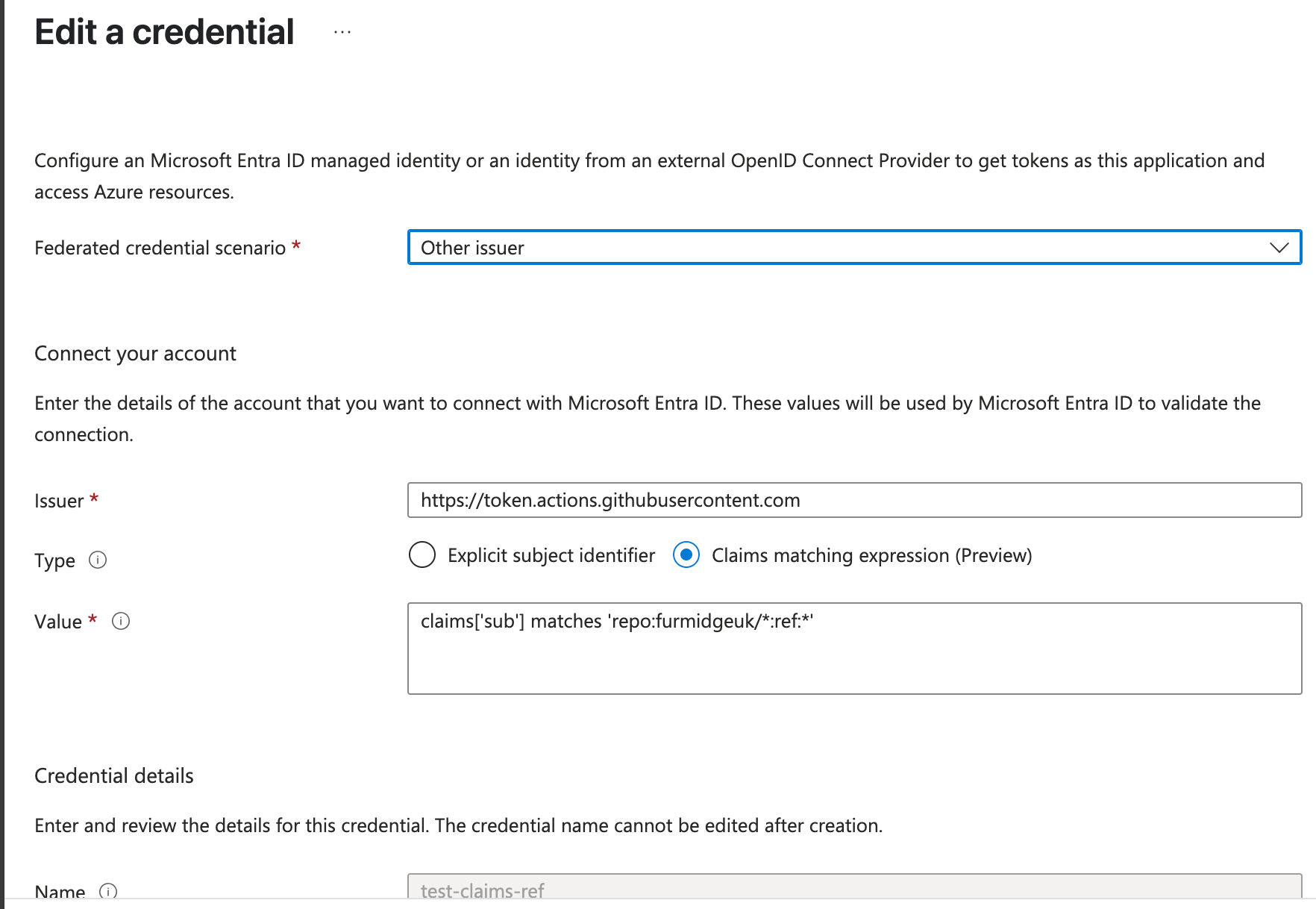
<div class="language-plaintext highlighter-rouge"><div class="highlight"><pre class="highlight"><code>claims['sub'] matches 'repo:furmidgeuk/*:ref:*'
</code></pre></div></div>
<ul>
  <li>Allows authentication for any repository in the organization for branch-based workflows.</li>
</ul>

<h4 id="federated-credential-2-environment-based-workflows"><strong>Federated Credential 2 (Environment-Based Workflows)</strong></h4>
<div class="language-plaintext highlighter-rouge"><div class="highlight"><pre class="highlight"><code>claims['sub'] matches 'repo:furmidgeuk/*:environment:*'
</code></pre></div></div>
<ul>
  <li>Allows authentication for GitHub Environments.</li>
</ul>

<h4 id="federated-credential-3-pull-request-workflows"><strong>Federated Credential 3 (Pull Request Workflows)</strong></h4>
<div class="language-plaintext highlighter-rouge"><div class="highlight"><pre class="highlight"><code>claims['sub'] matches 'repo:furmidgeuk/*:pull_request'
</code></pre></div></div>
<ul>
  <li>Allows authentication for any repository in the organisation for pull requests.
    <h3 id="further-refinements"><strong>Further Refinements</strong></h3>
    <p>To increase granularity, we could also:</p>
  </li>
</ul>

<ol>
  <li>Restrict to the <strong>main branch only</strong>:
    <div class="language-plaintext highlighter-rouge"><div class="highlight"><pre class="highlight"><code>claims['sub'] matches 'repo:furmidgeuk/*:ref:refs/heads/main'
</code></pre></div>    </div>
  </li>
  <li>Specify <strong>individual environments</strong>:
    <div class="language-plaintext highlighter-rouge"><div class="highlight"><pre class="highlight"><code>claims['sub'] matches 'repo:furmidgeuk/*:environment:dev'
claims['sub'] matches 'repo:furmidgeuk/*:environment:tst'
claims['sub'] matches 'repo:furmidgeuk/*:environment:val'
claims['sub'] matches 'repo:furmidgeuk/*:environment:prd'
</code></pre></div>    </div>
  </li>
  <li>Attempting to combine environments into a single claim failed:
    <div class="language-plaintext highlighter-rouge"><div class="highlight"><pre class="highlight"><code>claims['sub'] matches 'repo:furmidgeuk/*:environment:dev' and claims['sub'] matches 'repo:furmidgeuk/*:environment:dev'
</code></pre></div>    </div>
    <ul>
      <li>The <code class="language-plaintext highlighter-rouge">and</code> operator does not work with multiple <code class="language-plaintext highlighter-rouge">sub</code> claims.</li>
    </ul>
  </li>
</ol>

<h3 id="testing-results"><strong>Testing Results</strong></h3>
<p>The solution was tested successfully with the following claims:</p>
<div class="language-plaintext highlighter-rouge"><div class="highlight"><pre class="highlight"><code>claims['sub'] matches 'repo:furmidgeuk/*:ref:*'
claims['sub'] matches 'repo:furmidgeuk/*:environment:*'
claims['sub'] matches 'repo:furmidgeuk/*:pull_request'
</code></pre></div></div>
<ul>
  <li>Authentication worked across all repositories and branches in combination with all environments.</li>
</ul>

<p>We also tested this solution successfully when creating the following claims:-</p>

<div class="language-plaintext highlighter-rouge"><div class="highlight"><pre class="highlight"><code>claims['sub'] matches 'repo:testrepo/*:ref:*'
claims['sub'] matches 'repo:testrepo/*:pull_request'
claims['sub'] matches 'repo:testrepo/*:environment:prd'
</code></pre></div></div>

<p>Again the authentication worked as desired. Here is a screenshot from one of the claims:-</p>

<p><img src="/assets/images/fed-cred.png" alt="federated credentials" /></p>

<p>Here is the output from the github action that used these federated credentials:-</p>

<div class="language-plaintext highlighter-rouge"><div class="highlight"><pre class="highlight"><code>Running Azure CLI Login.
/usr/bin/az cloud set -n azurecloud
Done setting cloud: "azurecloud"
Federated token details:
 issuer - https://token.actions.githubusercontent.com
 subject claim - repo:testrepo/github:environment:prd
Attempting Azure CLI login by using OIDC...
Subscription is set successfully.
Azure CLI login succeeds by using OIDC.

</code></pre></div></div>
<h3 id="security-considerations"><strong>Security Considerations</strong></h3>
<p>The <code class="language-plaintext highlighter-rouge">Claims Matching Expression</code> we have tested currently allows any repository within the <code class="language-plaintext highlighter-rouge">testrepo</code> organization to authenticate and deploy to Azure. To prevent unauthorized deployments, we must ensure that only trusted repositories can be created within the organization.</p>

<h4 id="steps-to-restrict-repository-creation"><strong>Steps to Restrict Repository Creation:</strong></h4>
<ul>
  <li><strong>Disable Repository Creation for Non-Admins</strong>
    <ul>
      <li>Navigate to <code class="language-plaintext highlighter-rouge">testrepo → Settings → Member Privileges</code>.</li>
      <li>
        <p>Uncheck the following options under <code class="language-plaintext highlighter-rouge">Repository creation</code>:</p>

        <p>❌ Private repositories</p>

        <p>❌ Internal repositories</p>
      </li>
      <li>This prevents regular members from creating repositories that could inherit federated credentials.</li>
    </ul>
  </li>
  <li><strong>Restrict Repository Creation to Admins and GitHub App</strong>
    <ul>
      <li>Only <code class="language-plaintext highlighter-rouge">Admin members</code> and the <code class="language-plaintext highlighter-rouge">GitHub App</code> should have the ability to create repositories.</li>
      <li>This ensures that all repositories requiring federated credentials are explicitly reviewed and approved.</li>
    </ul>
  </li>
</ul>

<p>By enforcing these restrictions, we mitigate the risk of unauthorized repository creation and ensure that only trusted repositories can leverage federated authentication for Azure deployments.</p>

<h2 id="conclusion-and-considerations"><strong>Conclusion and Considerations</strong></h2>
<p>This approach provides a <strong>scalable</strong> and <strong>manageable</strong> solution to Azure’s federated credential limit. While it is currently well within the <code class="language-plaintext highlighter-rouge">20</code> federated credential limit, continuous monitoring and refinements may be required as the number of repositories and environments grow.</p>

<h3 id="considerations"><strong>Considerations:</strong></h3>
<ol>
  <li>Further <strong>granular control</strong> by refining claims.</li>
  <li>Evaluate <strong>security implications</strong> of wildcard-based authentication.</li>
  <li>If possible, automate <strong>credential provisioning</strong> to streamline future updates.</li>
</ol>

<p>This approach balances <strong>security</strong>, <strong>scalability</strong>, and <strong>manageability</strong> while complying with Azure’s limitations on federated credentials.</p>

<h2 id="workflow-used-for-testing">Workflow used for testing</h2>

<div class="language-plaintext highlighter-rouge"><div class="highlight"><pre class="highlight"><code>name: Test Federated Credentials
on:
  pull_request:
     branches:
       - main
  workflow_dispatch:
    inputs:
      environment:
        description: "Deployment environment (dev, tst, prd)"
        required: true
        type: choice
        options:
          - dev
          - tst
          - prd

permissions:
  id-token: write
  contents: read

jobs:
  test-fed-credentials:
    runs-on: ubuntu-latest
    environment: $
    steps:
      - name: Checkout repository
        uses: actions/checkout@v4
      - name: Authenticate to Azure for $
        uses: azure/login@v2
        with:
          client-id: $
          tenant-id: $
          subscription-id: $
</code></pre></div></div>]]></content><author><name>Dave Furmidge</name></author><category term="Azure" /><category term="azure" /><summary type="html"><![CDATA[Background Federated identity credentials in workload identity federation require an exact match between the defined subject, issuer, and audience in the credential and those in the token sent to Microsoft Entra. Due to the current limit of 20 federated identity credentials per application or user-assigned managed identity, scaling constraints can be reached quickly.]]></summary></entry><entry><title type="html">Custom Resource Providers vs Managed Applications in Azure: When to Use What</title><link href="https://devopswithdave.com/azure/arm%20templates/cloud%20architecture/post-crv-vs-managed-application/" rel="alternate" type="text/html" title="Custom Resource Providers vs Managed Applications in Azure: When to Use What" /><published>2025-05-16T00:00:00+00:00</published><updated>2025-05-16T00:00:00+00:00</updated><id>https://devopswithdave.com/azure/arm%20templates/cloud%20architecture/post-crv-vs-managed-application</id><content type="html" xml:base="https://devopswithdave.com/azure/arm%20templates/cloud%20architecture/post-crv-vs-managed-application/"><![CDATA[<p>Azure offers two powerful mechanisms for exposing services and extending the platform: <strong>Custom Resource Providers (CRP)</strong> and <strong>Managed Applications</strong>. While they both allow you to expose functionality to Azure users, they differ significantly in scope and purpose. This post breaks down the key differences, use cases, and example ARM templates for each.</p>

<h2 id="key-difference-in-exposure">Key Difference in Exposure</h2>

<h3 id="custom-resource-providers-crp">Custom Resource Providers (CRP):</h3>
<ul>
  <li>Expose a service as a <strong>first-class Azure resource type</strong> (e.g., <code class="language-plaintext highlighter-rouge">MyCompany.Proxy</code>) with its own API surface.</li>
  <li>The service appears and behaves like a native Azure resource (e.g., <code class="language-plaintext highlighter-rouge">Microsoft.Storage/storageAccounts</code>).</li>
  <li>Ideal for creating custom resource types that are provisioned, managed, and interacted with like native Azure resources.</li>
</ul>

<h3 id="managed-applications">Managed Applications:</h3>
<ul>
  <li>Expose a <strong>pre-packaged solution</strong> as a single deployable unit in the customer’s subscription.</li>
  <li>The provider retains management control, while the customer consumes the service through a managed identity or service principal.</li>
  <li>Ideal for SaaS-style offerings that bundle multiple resources and require ongoing management.</li>
</ul>

<h2 id="use-cases-and-decision-criteria">Use Cases and Decision Criteria</h2>

<table>
  <thead>
    <tr>
      <th>Criteria</th>
      <th>Custom Resource Provider</th>
      <th>Managed Application</th>
    </tr>
  </thead>
  <tbody>
    <tr>
      <td>Custom API Endpoint</td>
      <td>You need to expose a custom API endpoint as a resource in Azure, such as <code class="language-plaintext highlighter-rouge">MyCompany.Proxy</code>.</td>
      <td>Not suitable. Managed Apps are packaged solutions, not custom API endpoints.</td>
    </tr>
    <tr>
      <td>Service Integration</td>
      <td>You want to integrate a third-party service and expose it as an Azure resource type.</td>
      <td>You want to provide a service composed of multiple resources (e.g., VM + Function + Storage).</td>
    </tr>
    <tr>
      <td>Lifecycle Management</td>
      <td>The logic of the service is external, and you need full control over scaling, monitoring, and versioning.</td>
      <td>The service includes multiple Azure resources, and you need to manage their lifecycle as a cohesive unit.</td>
    </tr>
    <tr>
      <td>SaaS Offering</td>
      <td>Not ideal for SaaS. Focus is on extending Azure API capabilities.</td>
      <td>Ideal for SaaS-like solutions where you manage resources in a customer’s subscription.</td>
    </tr>
    <tr>
      <td>Access Control</td>
      <td>Azure AD and RBAC at the resource level.</td>
      <td>Managed Identity or Service Principal, with customer-configured RBAC.</td>
    </tr>
    <tr>
      <td>User Experience</td>
      <td>The service is exposed as a native Azure resource, integrated with ARM, CLI, and Portal.</td>
      <td>The service is deployed as a packaged application, with customer-facing configuration and management.</td>
    </tr>
  </tbody>
</table>

<h2 id="example-scenarios">Example Scenarios</h2>

<h3 id="scenario-1-proxy-api-layer-exposing-a-custom-function">Scenario 1: Proxy API Layer Exposing a Custom Function</h3>
<ul>
  <li><strong>Requirement:</strong> A team wants to create a service that validates JSON data against a schema and returns the result. This service is implemented as an Azure Function.</li>
</ul>

<p><strong>CRP Approach:</strong></p>
<ul>
  <li>Create a CRP called <code class="language-plaintext highlighter-rouge">MyCompany.Validator</code>.</li>
  <li>Expose a <code class="language-plaintext highlighter-rouge">validate</code> operation that forwards requests to the Azure Function.</li>
  <li>The user interacts with the <code class="language-plaintext highlighter-rouge">MyCompany.Validator</code> resource as they would with any Azure resource.</li>
  <li>Azure handles identity, API versioning, and access management.</li>
</ul>

<p><strong>Why CRP?</strong></p>
<ul>
  <li>The focus is on creating a reusable, first-class Azure resource that is part of the Azure API ecosystem.</li>
  <li>The service appears as a native resource and can be managed with Azure policies, RBAC, etc.</li>
</ul>

<h3 id="scenario-2-multi-resource-saas-deployment">Scenario 2: Multi-Resource SaaS Deployment</h3>
<ul>
  <li><strong>Requirement:</strong> A team has developed a security monitoring solution that includes:
    <ul>
      <li>A VM for running a scanning agent.</li>
      <li>A Logic App for alerting.</li>
      <li>An Azure SQL Database for reporting.</li>
    </ul>
  </li>
</ul>

<p><strong>Managed Application Approach:</strong></p>
<ul>
  <li>Package all resources as a Managed Application.</li>
  <li>Customer deploys the app into their subscription.</li>
  <li>The service provider manages the scanning agent, alerting logic, and database schema.</li>
</ul>

<p><strong>Why Managed Application?</strong></p>
<ul>
  <li>The service consists of multiple interdependent resources.</li>
  <li>The service provider needs ongoing access to manage and update the components.</li>
  <li>The customer maintains the resources but delegates management to the provider.</li>
</ul>

<h2 id="example-arm-templates">Example ARM Templates</h2>

<div class="language-json highlighter-rouge"><div class="highlight"><pre class="highlight"><code><span class="err">/*</span><span class="w">
</span><span class="err">Azure</span><span class="w"> </span><span class="err">Custom</span><span class="w"> </span><span class="err">Resource</span><span class="w"> </span><span class="err">Provider</span><span class="w"> </span><span class="err">(CRP)</span><span class="w"> </span><span class="err">ARM</span><span class="w"> </span><span class="err">Template</span><span class="w">
</span><span class="err">-</span><span class="w"> </span><span class="err">This</span><span class="w"> </span><span class="err">template</span><span class="w"> </span><span class="err">deploys</span><span class="w"> </span><span class="err">a</span><span class="w"> </span><span class="err">Custom</span><span class="w"> </span><span class="err">Resource</span><span class="w"> </span><span class="err">Provider</span><span class="w"> </span><span class="err">that</span><span class="w"> </span><span class="err">acts</span><span class="w"> </span><span class="err">as</span><span class="w"> </span><span class="err">a</span><span class="w"> </span><span class="err">proxy</span><span class="w"> </span><span class="err">to</span><span class="w"> </span><span class="err">an</span><span class="w"> </span><span class="err">Azure</span><span class="w"> </span><span class="err">Function.</span><span class="w">
</span><span class="err">*/</span><span class="w">
</span><span class="p">{</span><span class="w">
  </span><span class="nl">"$schema"</span><span class="p">:</span><span class="w"> </span><span class="s2">"https://schema.management.azure.com/schemas/2019-04-01/deploymentTemplate.json#"</span><span class="p">,</span><span class="w">
  </span><span class="nl">"contentVersion"</span><span class="p">:</span><span class="w"> </span><span class="s2">"1.0.0.0"</span><span class="p">,</span><span class="w">
  </span><span class="nl">"resources"</span><span class="p">:</span><span class="w"> </span><span class="p">[</span><span class="w">
    </span><span class="p">{</span><span class="w">
      </span><span class="nl">"type"</span><span class="p">:</span><span class="w"> </span><span class="s2">"Microsoft.Resources/deploymentScripts"</span><span class="p">,</span><span class="w">
      </span><span class="nl">"apiVersion"</span><span class="p">:</span><span class="w"> </span><span class="s2">"2020-10-01"</span><span class="p">,</span><span class="w">
      </span><span class="nl">"name"</span><span class="p">:</span><span class="w"> </span><span class="s2">"crp-function-proxy"</span><span class="p">,</span><span class="w">
      </span><span class="nl">"location"</span><span class="p">:</span><span class="w"> </span><span class="s2">"[resourceGroup().location]"</span><span class="p">,</span><span class="w">
      </span><span class="nl">"properties"</span><span class="p">:</span><span class="w"> </span><span class="p">{</span><span class="w">
        </span><span class="nl">"scriptContent"</span><span class="p">:</span><span class="w"> </span><span class="s2">"az functionapp create --name myFunctionApp --resource-group [resourceGroup().name] --consumption-plan-location [resourceGroup().location]"</span><span class="p">,</span><span class="w">
        </span><span class="nl">"cleanupPreference"</span><span class="p">:</span><span class="w"> </span><span class="s2">"OnSuccess"</span><span class="p">,</span><span class="w">
        </span><span class="nl">"forceUpdateTag"</span><span class="p">:</span><span class="w"> </span><span class="s2">"1"</span><span class="w">
      </span><span class="p">}</span><span class="w">
    </span><span class="p">},</span><span class="w">
    </span><span class="p">{</span><span class="w">
      </span><span class="nl">"type"</span><span class="p">:</span><span class="w"> </span><span class="s2">"Microsoft.CustomProviders/resourceProviders"</span><span class="p">,</span><span class="w">
      </span><span class="nl">"apiVersion"</span><span class="p">:</span><span class="w"> </span><span class="s2">"2018-09-01-preview"</span><span class="p">,</span><span class="w">
      </span><span class="nl">"name"</span><span class="p">:</span><span class="w"> </span><span class="s2">"myCompany.proxy"</span><span class="p">,</span><span class="w">
      </span><span class="nl">"location"</span><span class="p">:</span><span class="w"> </span><span class="s2">"[resourceGroup().location]"</span><span class="p">,</span><span class="w">
      </span><span class="nl">"properties"</span><span class="p">:</span><span class="w"> </span><span class="p">{</span><span class="w">
        </span><span class="nl">"resourceTypes"</span><span class="p">:</span><span class="w"> </span><span class="p">[</span><span class="w">
          </span><span class="p">{</span><span class="w">
            </span><span class="nl">"name"</span><span class="p">:</span><span class="w"> </span><span class="s2">"validate"</span><span class="p">,</span><span class="w">
            </span><span class="nl">"endpoint"</span><span class="p">:</span><span class="w"> </span><span class="s2">"[concat('https://', variables('functionAppUrl'), '/api/validate')]"</span><span class="w">
          </span><span class="p">}</span><span class="w">
        </span><span class="p">]</span><span class="w">
      </span><span class="p">}</span><span class="w">
    </span><span class="p">}</span><span class="w">
  </span><span class="p">]</span><span class="w">
</span><span class="p">}</span><span class="w">
</span></code></pre></div></div>

<div class="language-json highlighter-rouge"><div class="highlight"><pre class="highlight"><code><span class="err">/*</span><span class="w">
</span><span class="err">Azure</span><span class="w"> </span><span class="err">Managed</span><span class="w"> </span><span class="err">Application</span><span class="w"> </span><span class="err">ARM</span><span class="w"> </span><span class="err">Template</span><span class="w">
</span><span class="err">-</span><span class="w"> </span><span class="err">This</span><span class="w"> </span><span class="err">template</span><span class="w"> </span><span class="err">deploys</span><span class="w"> </span><span class="err">a</span><span class="w"> </span><span class="err">VM,</span><span class="w"> </span><span class="err">a</span><span class="w"> </span><span class="err">Function,</span><span class="w"> </span><span class="err">and</span><span class="w"> </span><span class="err">a</span><span class="w"> </span><span class="err">Storage</span><span class="w"> </span><span class="err">Account</span><span class="w"> </span><span class="err">as</span><span class="w"> </span><span class="err">a</span><span class="w"> </span><span class="err">managed</span><span class="w"> </span><span class="err">application.</span><span class="w">
</span><span class="err">*/</span><span class="w">
</span><span class="p">{</span><span class="w">
  </span><span class="nl">"$schema"</span><span class="p">:</span><span class="w"> </span><span class="s2">"https://schema.management.azure.com/schemas/2019-04-01/deploymentTemplate.json#"</span><span class="p">,</span><span class="w">
  </span><span class="nl">"contentVersion"</span><span class="p">:</span><span class="w"> </span><span class="s2">"1.0.0.0"</span><span class="p">,</span><span class="w">
  </span><span class="nl">"resources"</span><span class="p">:</span><span class="w"> </span><span class="p">[</span><span class="w">
    </span><span class="p">{</span><span class="w">
      </span><span class="nl">"type"</span><span class="p">:</span><span class="w"> </span><span class="s2">"Microsoft.Solutions/applications"</span><span class="p">,</span><span class="w">
      </span><span class="nl">"apiVersion"</span><span class="p">:</span><span class="w"> </span><span class="s2">"2019-07-01"</span><span class="p">,</span><span class="w">
      </span><span class="nl">"name"</span><span class="p">:</span><span class="w"> </span><span class="s2">"managedAppDeployment"</span><span class="p">,</span><span class="w">
      </span><span class="nl">"location"</span><span class="p">:</span><span class="w"> </span><span class="s2">"[resourceGroup().location]"</span><span class="p">,</span><span class="w">
      </span><span class="nl">"properties"</span><span class="p">:</span><span class="w"> </span><span class="p">{</span><span class="w">
        </span><span class="nl">"managedResourceGroupId"</span><span class="p">:</span><span class="w"> </span><span class="s2">"[resourceGroup().id]"</span><span class="p">,</span><span class="w">
        </span><span class="nl">"applicationDefinitionId"</span><span class="p">:</span><span class="w"> </span><span class="s2">"/subscriptions/{subscriptionId}/resourceGroups/{resourceGroupName}/providers/Microsoft.Solutions/applicationDefinitions/{definitionName}"</span><span class="p">,</span><span class="w">
        </span><span class="nl">"parameters"</span><span class="p">:</span><span class="w"> </span><span class="p">{</span><span class="w">
          </span><span class="nl">"vmName"</span><span class="p">:</span><span class="w"> </span><span class="p">{</span><span class="w"> </span><span class="nl">"value"</span><span class="p">:</span><span class="w"> </span><span class="s2">"myVM"</span><span class="w"> </span><span class="p">},</span><span class="w">
          </span><span class="nl">"functionName"</span><span class="p">:</span><span class="w"> </span><span class="p">{</span><span class="w"> </span><span class="nl">"value"</span><span class="p">:</span><span class="w"> </span><span class="s2">"myFunctionApp"</span><span class="w"> </span><span class="p">},</span><span class="w">
          </span><span class="nl">"storageAccountName"</span><span class="p">:</span><span class="w"> </span><span class="p">{</span><span class="w"> </span><span class="nl">"value"</span><span class="p">:</span><span class="w"> </span><span class="s2">"mystorageacct"</span><span class="w"> </span><span class="p">}</span><span class="w">
        </span><span class="p">}</span><span class="w">
      </span><span class="p">}</span><span class="w">
    </span><span class="p">}</span><span class="w">
  </span><span class="p">]</span><span class="w">
</span><span class="p">}</span><span class="w">
</span></code></pre></div></div>

<h2 id="key-takeaway">Key Takeaway:</h2>
<ul>
  <li>Use a <strong>Custom Resource Provider</strong> when you want to extend Azure’s API with a new resource type or operation that behaves like a native Azure resource.</li>
  <li>Use a <strong>Managed Application</strong> when you want to bundle multiple Azure resources into a single, deployable solution that you manage on behalf of the customer.</li>
</ul>]]></content><author><name>Dave Furmidge</name></author><category term="Azure" /><category term="ARM Templates" /><category term="Cloud Architecture" /><category term="azure" /><category term="arm" /><category term="architecture" /><summary type="html"><![CDATA[Azure offers two powerful mechanisms for exposing services and extending the platform: Custom Resource Providers (CRP) and Managed Applications. While they both allow you to expose functionality to Azure users, they differ significantly in scope and purpose. This post breaks down the key differences, use cases, and example ARM templates for each.]]></summary></entry></feed>